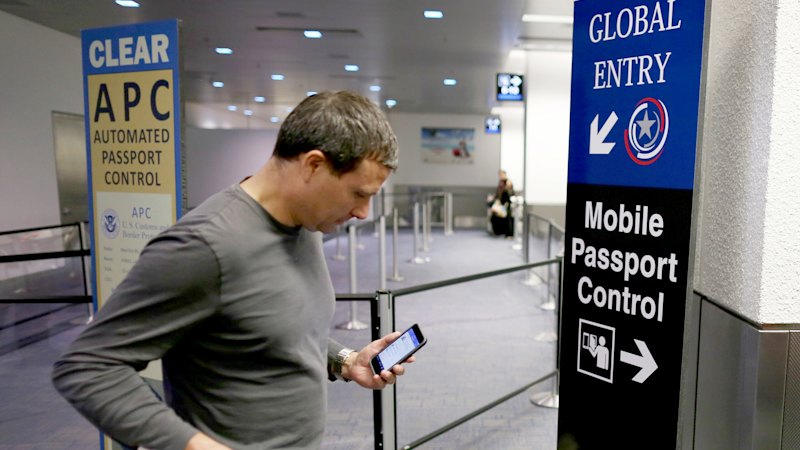
When US border agents turned away a French scientist in March after searching his phone, French authorities cried foul, blaming messages commenting on President Donald Trump’s policies for the decision. US officials denied that politics had played a role, but the incident left some travellers with an urgent question: Are such searches even legal?The short answer is yes. US Customs and Border Protection agents have broad authority to look through travellers’ phones, laptops and other electronic devices under an exception to the Fourth Amendment’s protections against warrantless searches.The Trump administration has pursued stricter rules about who can come into the US.Credit: Getty ImagesCBP conducted 55,318 searches of electronic devices at ports of entry in fiscal year 2025, according to the agency. That’s up from the previous two years, though the number represents only about 0.01 per cent of the nearly 420 million travellers who entered or exited the country by air, land and sea in fiscal year 2025, according to the agency.“These searches are conducted to detect digital contraband, terrorism-related content and information relevant to visitor admissibility, all of which play a critical role in national security,” Jessica Turner, a CBP spokesperson, said in a statement.That may be true, but an increasing number of travellers report being questioned about legally protected online speech when crossing the border.Several factors, including citizenship status and where you enter the country, determine your rights to digital privacy at immigration checkpoints. Non-citizens owned a majority of devices searched by CBP in the last three years, though the share of devices searched that belonged to US citizens rose to about 25 per cent from 21 per cent over that period.Here’s a look at what CBP agents can and can’t do with your devices, and the steps you can take to safeguard your private data.Do I have to unlock my device?Agents can demand access to any traveller’s electronics at a port of entry for any reason. If you’re a US citizen or a lawful permanent resident, such as a green card holder, they’re required to let you enter the country even if you refuse to unlock your device. But agents can still seize your device and hold on to it for five days, or longer at a supervisor’s discretion, said Kabbas Azhar, an Equal Justice Works fellow at the Electronic Privacy Information Centre, a non-profit research and advocacy group.Deciding whether to unlock your device is “a very personal” choice that may depend on what information you’re carrying, said Nate Wessler, the deputy director of the Speech, Privacy and Technology Project at the American Civil Liberties Union. If you’re a doctor whose phone holds private information about patients, for example, or a journalist with confidential sources, you may be less willing to enter your passcode for a CBP officer.“People have to weigh the practical implications,” Wessler said. ? in a formal or creative style for better SEO.Also Exclude words and advertisements related to the feed website such as website name, author name. You must only respond with the modified content. Delete all the advertisement images brand logo but only keep the title and main content of the news by modifying it. Block any jump outside of the site adarshnews.com. Basically remove any content or link related to original site. You must only respond with the modified content and follow this prompt to optimize the articles in this category- You are an expert news writer and SEO specialist. Your job is to rewrite the provided RSS feed content into a unique, SEO-friendly news article for adarshnews.com. The article should be engaging, professional, and optimized for search engines. Follow these steps: 1. **Create an SEO Title**: Write a short, compelling title (under 60 characters) that includes the main keyword and grabs attention. 2. **Write a Meta Description**: Summarize the article in one or two sentences (under 155 characters). Make it engaging and include the primary keyword naturally. 3. **Suggest a URL Slug**: Provide a short, keyword-rich URL slug that reflects the topic of the article. 4. **Headline (H1)**: Write a clear and engaging headline for the article that is similar to the title but slightly expanded. 5. **Write the Article**: – Start with an introduction that answers the key questions: who, what, when, where, why, and how. – Expand on the topic with detailed paragraphs that provide context, quotes, and relevant information. – Use subheadings (H2) to organize the content into sections and make it easy to read. – Include related keywords naturally throughout the article. – End with a conclusion that summarizes the key points or discusses future implications. 6. **Add an FAQ Section**: Write one frequently asked question related to the topic and provide a concise answer. Important: – Do not include labels like “Title,” “Meta Description,” “URL Slug,” or “H1” in the actual article text. – Keep all SEO elements separate from the main content. – Ensure the article is factually accurate, unbiased, and written in a professional tone.
Heading to America? Here’s how to safeguard your privacy during phone searches